
Java 8 Streams

One of the features of Java 8 and best practices is the use of streams.

In this tutorial, we’ll see how to use the Stream.filter() method when we work with Streams in Java.

The filter() method is an intermediate operation of the Stream interface that allows us to filter elements of a stream that match a given Predicate: A common use case of the filter() method is processing collections.

We shall demonstrate a sample in this tutorial.

First: we create a Student class. Each student will have a name, gender, age and a list of courses of which he is enrolled into. We also create Gender and Course enums.

enum Gender {MALE, FEMALE}
enum Course {DATA_STRUCTURES, DATABASE, JAVA, OPERATING_SYSTEMS, NETWORKS, OBJECT_ORIENTED_PROGRAMMING, DOTNET, C}
class Student {
    private String name;
    private int age;
    private Gender gender;
    private List<Course> courses = new ArrayList<Course>();
    public Student(String name, int age, Gender gender) {
        this.name = name;
        this.age = age;
        this.gender = gender;
    }
    public String getName() {
        return name;
    }
    public void setName(String name) {
        this.name = name;
    }
    public int getAge() {
        return age;
    }
    public void setAge(int age) {
        this.age = age;
    }
    public Gender getGender() {
        return gender;
    }
    public void setGender(Gender gender) {
        this.gender = gender;
    }
    public List<Course> getCourses() {
        return courses;
    }
    public void setCourses(List<Course> courses) {
        this.courses = courses;
    }
    @Override
    public String toString() {
        return “Student [name=” + name + “, age=” + age + “, gender=” + gender + “, courses=” + courses + “]”;
    }
}

Second: We created a list with some student classes and fill them up with data.

        List<Student> allStudents = new ArrayList<Student>();
        Student s1 = new Student(“Linda”, 18, Gender.FEMALE);
        s1.getCourses().add(Course.DATA_STRUCTURES);
        s1.getCourses().add(Course.DATABASE);
        s1.getCourses().add(Course.OBJECT_ORIENTED_PROGRAMMING);
        s1.getCourses().add(Course.NETWORKS);
        allStudents.add(s1);
        Student s2 = new Student(“Mary”, 20, Gender.FEMALE);
        s2.getCourses().add(Course.DATA_STRUCTURES);
        s2.getCourses().add(Course.JAVA);
        s2.getCourses().add(Course.OPERATING_SYSTEMS);
        s2.getCourses().add(Course.C);
        allStudents.add(s2);
        Student s3 = new Student(“Tina”, 21, Gender.FEMALE);
        s3.getCourses().add(Course.OBJECT_ORIENTED_PROGRAMMING);
        s3.getCourses().add(Course.JAVA);
        s3.getCourses().add(Course.OPERATING_SYSTEMS);
        s3.getCourses().add(Course.NETWORKS);
        allStudents.add(s3);
        Student s4 = new Student(“Antonio”, 18, Gender.MALE);
        s4.getCourses().add(Course.JAVA);
        s4.getCourses().add(Course.OPERATING_SYSTEMS);
        s4.getCourses().add(Course.NETWORKS);
        s4.getCourses().add(Course.DATABASE);
        allStudents.add(s4);
        Student s5 = new Student(“Ahmed”, 20, Gender.MALE);
        s5.getCourses().add(Course.DOTNET);
        s5.getCourses().add(Course.DATA_STRUCTURES);
        s5.getCourses().add(Course.OPERATING_SYSTEMS);
        s5.getCourses().add(Course.DATABASE);
        allStudents.add(s5);

Third: Let’s use filters on the students list. To do that, we can use a lambda expression:

1- We filter all students of age below 20 years.

List<Student> students1 = allStudents.stream().filter(s -> s.getAge() < 20).collect(Collectors.toList());

2- We filter to find one student that is below 20 yrs and male.

Student student = allStudents.stream().filter(s -> s.getAge() < 20 && Gender.MALE.equals(s.getGender())).findAny().orElse(null);

3- We find all students that are female and taking Java course.

List<Student> students2 = allStudents.stream().filter(s -> Gender.FEMALE.equals(s.getGender()) && s.getCourses().stream().anyMatch(c -> Course.JAVA.equals(c))).collect(Collectors.toList());
What is DevOps?

DevOps is the latest buzzword in the world of software development. But what exactly is DevOps? In this article we shall make a brief introduction about DevOps to get familiar with the concept.

Traditional software develoment used the waterfall model. Which consisted of the below stages:

  • Requirements gathering and creating SRS
  • Planning and design
  • Implementation and development
  • Quality assurance
  • Deployment
  • Regular Maintenance

The Waterfall model worked fine and served well for many years, however it had some challenges.

From developers point of view:

  • After Development, the code deployment time was huge.
  • Pressure of work on old, pending and new code was high because development and deployment time was high.

From operations point of view:

  • It was difficult to maintain 100% uptime of the production environment.
  • Infrastructure Automation tools were not very affective.
  • Number of severs to be monitored keeps on increasing with time and hence the complexity.
  • It was very difficult to provide feedback and diagnose issue in the product.

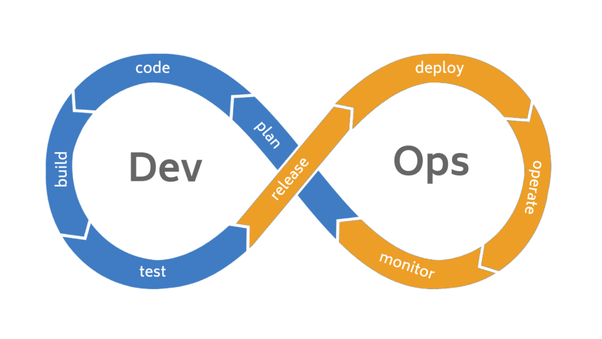
DevOps integrates development and operations team to improve collaboration and productivity. According to DevOps, a single group of Engineers (developers, system admins, QA’s. Testers etc turned into DevOps Engineers) has end to end responsibility of the Application (Software) right from gathering the requirement to development, to testing, to infrastructure deployment, to application deployment and finally monitoring & gathering feedback from the end users, then again implementing the changes. This is a never ending cycle and the logo of DevOps represents this concept.

main-qimg-1efe9b9f22be7c3c94afaa24a2e3fbc9

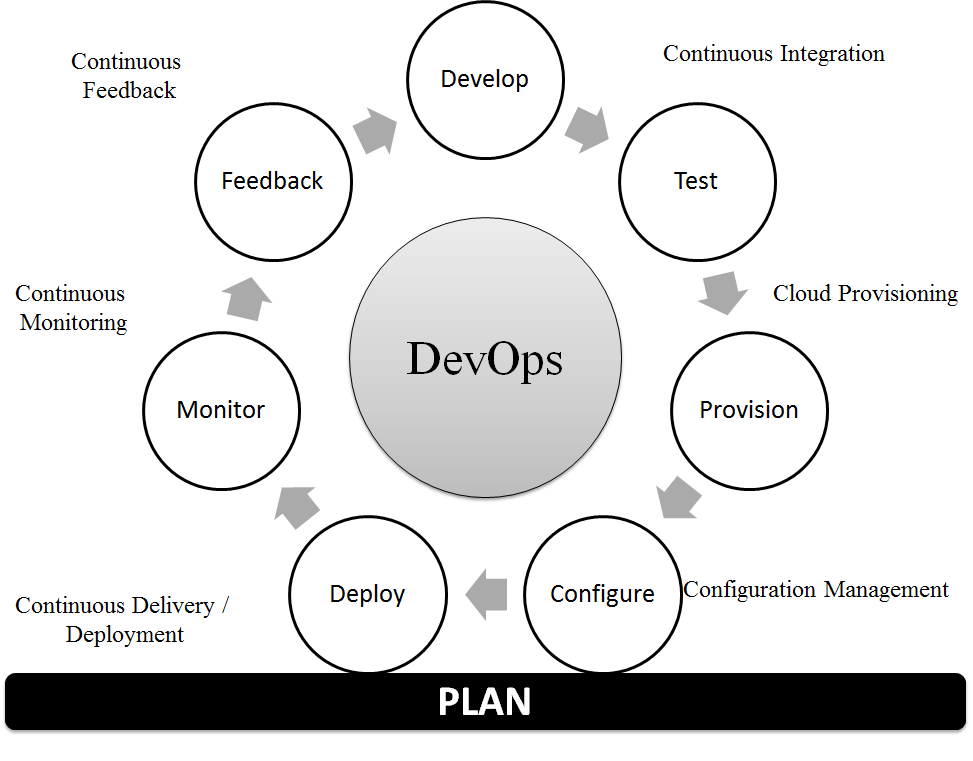
These are the building blocks(stages) for DevOps:

  • Continuous Development
  • Continuous Integration
  • Continuous Testing
  • Continuous Monitoring
  • Virtualization and Containerization

B05561_01_05

There are many tools that can be used for DevOps, the most famous tools are: Gradle, Git, Jenkins, Bamboo, Docker, Kubernetes, Puppet Enterprise, Ansible, Nagios, Raygun, Jira, Maven, ELK (Elasticsearch, Logstash, Kibana).

Nvidia RTX 2070 setup with Tensorflow and Keras on Windows 10

This is a guide on how to setup a deep learning environment on Windows 10 to use with Nvidia RTX 2070.

Prerequisite:

  • Windows 10
  • GPU Driver installed (You can download it from here https://www.nvidia.com/Download/index.aspx?lang=en-us)


Steps:

  • Download and install Anaconda https://www.anaconda.com/distribution/
  • Download and install Visual Studio 2017 community version RC.
  • Download and install CUDA Toolkit 10 https://developer.nvidia.com/cuda-downloads.
  • Download CuDNN https://developer.nvidia.com/cudnn. (You will need registration for this step)
  • Extract CuDNN package and copy the below files into the CUDA directory:
  • Copy the following files into the CUDA Toolkit directory
    1. Copy <cudnnpath>\cuda\bin\cudnn64_7.dll to <cudapath>\CUDA\v10.1\bin.
    2. Copy <cudnnpath>\cuda\include\cudnn.h to <cudapath>\CUDA\v10.1\include.
    3. Copy <cudnnpath>\cuda\lib\x64\cudnn.lib to <cudapath>\CUDA\v10.1\lib\x64.
  • Add the environment variables CUDA_PATH, CUDA_HOME AND CUDA_PATH_V10_1. Set value to “<yourcudapath>\CUDA\v10.1″
  • Add <yourcudapath>\CUDA\v10.1\bin” and <yourcudapath>\CUDA\v10.1\libnvvp” to your PATH variable.
  • Download and install OpenSSL and add its bin folder path into environment variables.
  • You may need to restart your PC for changes to take effect, then create a new environment on Anaconda with python version 3.5.2 and Tensorflow for GPU package.
    conda create --name DL tensorflow-gpu python=3.5.2
    
    activate DL
  • Execute below to upgrade Tensorflow, install Keras and other Deep Learning libraries.
    pip install --ignore-installed --upgrade tensorflow
    
    update packages from ui
    
    install keras from ui
    
    conda install -n DL scikit-learn --yes
    
    conda install -n DL pillow --yes
    
    conda install -n DL matplotlib--yes
    
    conda install -n DL opencv--yes
    
    conda install -n DL numpy==1.15.4 --yes